

How to Track Your Period With PCOS

Many period apps treat a 28-day rhythm as the default. When your bleed is still nowhere near day 29, the app may flag you as late even though nothing is late for your body. With polycystic ovary syndrome (PCOS), gaps between periods can stretch much longer than a textbook month, and the length can change from one cycle to the next. A fixed calendar guess is a poor fit.
Tracking still helps. A log on your phone can show your real range, whether things are shifting, and dates to bring to a clinician. This guide covers what to write down and how to read it back. It is not a diagnosis tool, and no app replaces blood tests or an exam when you want answers about your hormones.
Why date predictions struggle with PCOS irregular periods
Most cycle estimates start from the same idea: take your recent cycle lengths, find an average, and count forward from your last period. That works reasonably well when your lengths cluster close together. It falls apart when they do not.
If one cycle runs 34 days and the next runs 61, the average is a number that does not describe either month. An app may still show one neat “expected period” date, which can feel like precision even when your history says otherwise. For a longer read on why irregular lengths break prediction, see irregular cycles and what tracking can show.
PCOS is one reason periods can be irregular or separated by long gaps. The NHS lists irregular periods among the main symptoms. That does not mean every long cycle is PCOS, and it does not mean you should ignore your own pattern. It means a generic countdown is the wrong tool to judge whether you are “on time.”
What you want is not a single predicted day. It is an honest record of starts, stops, gaps, and what else was going on.
What to log
Keep the bar low. You are building a timeline you can scroll, not a perfect clinical chart. These fields repay the few seconds they take.
| What to log | Why it helps |
|---|---|
| Period start and end dates | Cycle length only makes sense when day one is consistent; see what counts as day one of your period |
| Spotting vs real flow | Spotting between periods is easy to forget; separating it from a true bleed keeps gaps accurate |
| Cycle length (start to start) | Shows your range and longest gap, not just a monthly average |
| Symptoms (pain, acne, excess hair, bloating) | Lets you notice clusters that repeat before or after bleeds |
| Mood | Mood shifts often track with hormonal changes even when dates do not |
| Sleep and stress | Big life weeks explain one-off long cycles without guessing |
| Medication or pill changes | Gives you a before-and-after story if a method or dose changed |
| Anything your clinician asked you to watch | Keeps one list aligned with your care plan |
Bleeding days matter most. Add symptoms when you notice them, and note medication changes on the day they happen.
How to spot patterns over months
Once you have three or more cycles logged, switch from daily worry to a quarterly review. Open your history and ask a few plain questions.
Look at the range, not only the average. With PCOS, the shortest and longest gaps often tell you more than a mean that lands in the middle of nowhere. Note the longest gap since you started logging. That number belongs in your pocket for appointments.
Watch spotting between periods. A few days of light spotting before a bleed is common. Spotting that keeps returning mid-cycle is worth marking; patterns are easier to see on a timeline than in memory.
Scan for symptom clusters. Some people get predictable acne, bloating, or mood dips even when the calendar date jumps. Those notes can sit beside bleed dates so you see what repeats.
After a medication change, compare the next two or three cycles to the two before it. You are building a dated before-and-after, not proving cause and effect in an app.
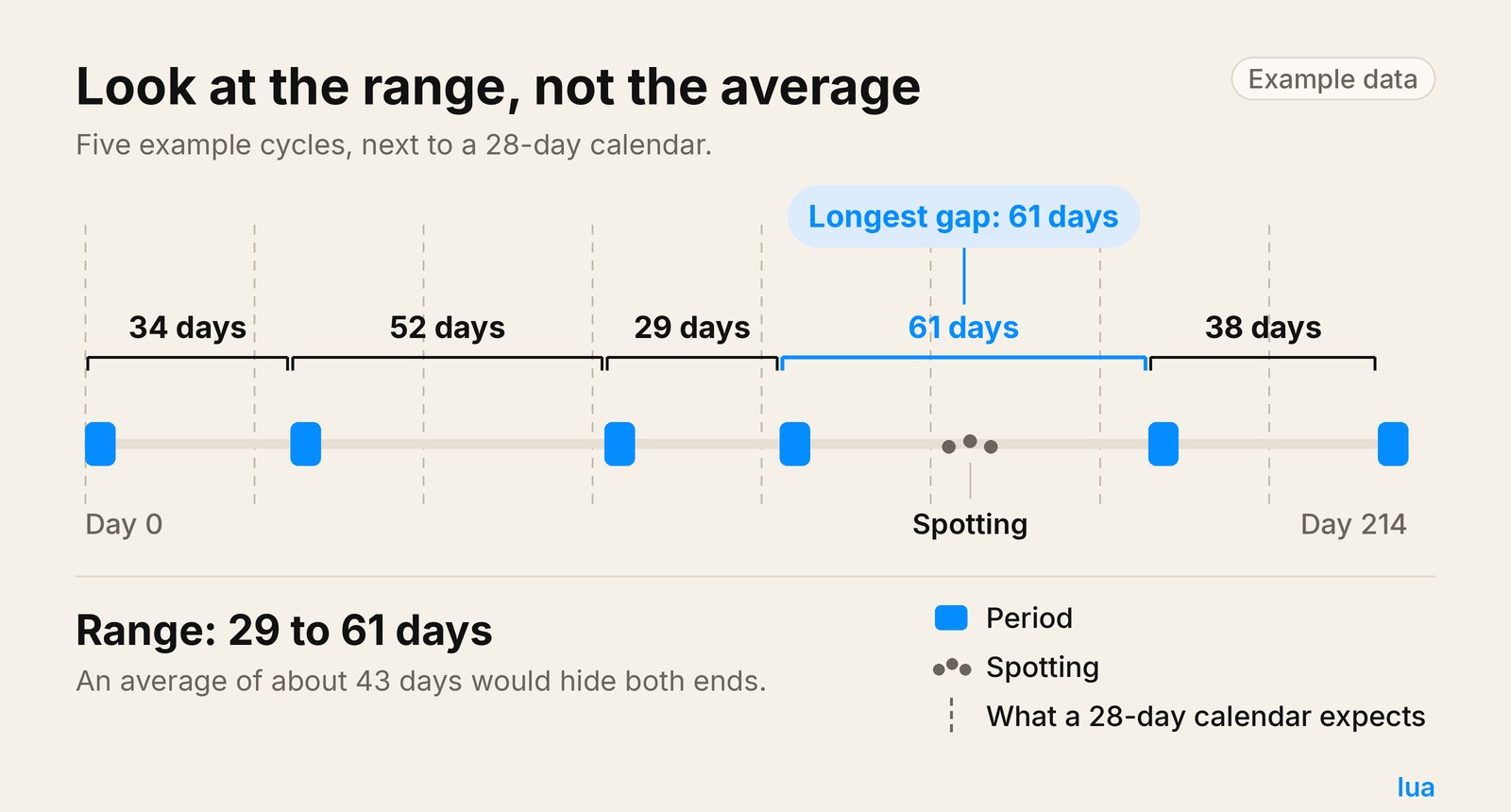
Example data: five made-up cycles on one timeline, with range and longest gap marked. Your own log will look different.
How to track irregular periods without the “late” alerts
“Late” in most apps means late compared with a predicted date, not late compared with your history. When predictions assume regularity, the alert fires early and often. That noise is exhausting, and it does not match how many people with PCOS experience bleeding.
A steadier approach:
Log bleeding when it happens. Tap start on the first day of real flow, and close the bleed when it ends. If you are unsure whether today counts as day one, the day-one guide above is the reference.
Keep outlier cycles in the history. Deleting a 60-day gap because it “messes up the average” hides the very pattern you might need to discuss. Your log should reflect what happened.
Review every three months, not every day. Daily checking against a predicted date keeps you tied to a guess. A quarterly scroll through start dates, gaps, and symptoms is enough to see drift, improvement, or repeat spotting.
If you want context on why apps show a single expected date at all, how to know when your period is coming explains how estimates are built from past cycles. The estimate is only as steady as the history behind it.
When a long gap also comes with pregnancy questions, a test and timing matter more than a calendar badge. Late period, negative pregnancy test walks through that pairing without treating an app as a pregnancy answer.
What to bring to an appointment
Doctors can help more when you arrive with dates, not only a feeling that things are all over the place. From your log, jot down:
- Your longest gap between day-one dates in the last year
- How many periods you had in the last 6 and 12 months (count starts of real flow)
- Any unusually long or heavy bleeds, with rough dates
The NHS advises seeing a GP if you have missed your period three times in a row, or if your periods have become irregular. That is a reasonable moment to talk, whether or not you already have a PCOS label.
Bring your phone or a short list of start dates and cycle lengths. Talk to your doctor about tests, treatment, or anything that worries you.
A private place for the dates
If you want bleeding, symptoms, mood, and sex logged in one timeline on your iPhone, Lua: Period & Birth Control keeps data on your device with no account. Everyone starts with a free trial of Lua+. After that, the free version still covers bleeding, sex, symptoms, and mood. Lua+ adds method reminders and fuller cycle stats.
Lua estimates your next period from the cycles you enter. It does not adjust for PCOS, detect it, or diagnose it. When your history is jumpy, the useful part is the log itself: your range, your gaps, and your notes in one place you control.
More from the blog
One app for your cycle, contraception, fertility and pregnancy.
Private, flexible and designed to adapt with you.